

Stop Making Your Users Play 'Will It Fit?'

Stop Making Your Users Play 'Will It Fit?'
The Problem
My steganography app lets users hide files inside images. Cool, right? Except users kept getting this:
❌ Error: Image doesn't have enough capacity.
After uploading everything. After waiting. After clicking the button.
So they'd try a bigger image. Upload again. Click. Fail. Repeat until rage-quit.
Not great for retention. 📉
The Solution
I added a real-time capacity calculator that shows users if their file will fit before they click anything.
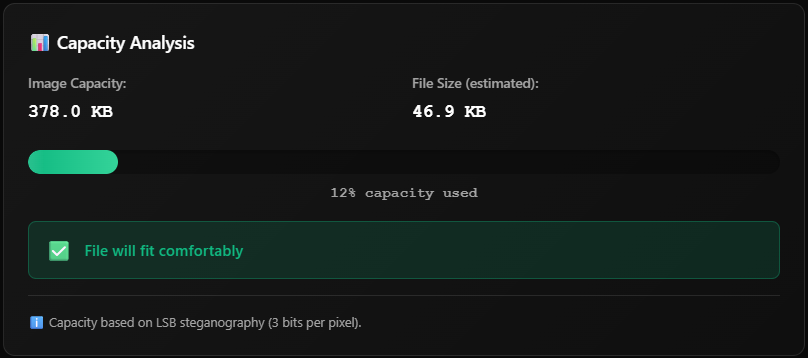
It's just a React component that:
Calculates capacity when files are selected
Shows a color-coded progress bar
Tells users upfront: "✅ File will fit comfortably" or "❌ Too big buddy"
The Code (The Interesting Bits)
Backend - Calculate how much fits in an image:
@api.route('/calculate-capacity', methods=['POST'])
def calculate_capacity():
    img = Image.open(image_path).convert("RGB")
    total_pixels = len(list(img.getdata()))

    # LSB stego: 3 bits per pixel / 8 = bytes
    capacity = (total_pixels * 3) // 8

    return jsonify({'totalCapacityBytes': capacity})
Frontend - Debounce so we don't spam the API:
useEffect(() => {
    // Wait 500ms after user stops typing
    const timeout = setTimeout(() => {
        calculateCapacity()
    }, 500)

    return () => clearTimeout(timeout)
}, [image, file, text, password])
The Pretty Part - Color-coded status:
const getStatus = (percentage) => {
    if (percentage > 100) return { icon: '❌', message: 'Too large!' }
    if (percentage > 90)  return { icon: '⚠️', message: 'Barely fits' }
    if (percentage > 70)  return { icon: '⚡', message: 'High capacity' }
    return { icon: '✅', message: 'Fits comfortably' }
}
The Plot Twist
I deployed it. Users loved it. Then:
❌ Failed to calculate capacity
Turns out my 50 req/hour rate limit couldn't handle users actually using the feature. Whoops.
Fix: Bumped to 100 req/hour + added debouncing = happy users.
The Results
Zero "file too large" complaints (down from many)
Users understand capacity limits without reading docs
App feels way more professional
I learned about debouncing the hard way
Key Takeaways
1. Show, don't tell - Real-time feedback > documentation
2. Debounce everything - Users type fast. Your API can't keep up. Plan accordingly.
3. Polish matters - That shine animation on the progress bar? Totally unnecessary. Users love it anyway.
4. Watch your rate limits - Good features get used. A lot. Be ready.
Try It Yourself
The full code is on GitHub. Feel free to steal, improve, or roast my implementation.
Sometimes the best features aren't the flashy new capabilities - they're the tiny UX tweaks that make users go "oh thank god, finally."
What small feature transformed your app's UX? Drop it in the comments! 👇
Building steganography tools at 3 AM with too much coffee ☕
Follow: @Mrtracker-new


